iRacing .ini, with switches
Known settings become switches, sliders and choices. Changes stay in a draft until you review and save them, and the files stay read-only while iRacing runs.
Everything PitCrew does, from the voice in your ear to the field of view on your screens.
Every category belongs to one crew member. Move a category to another crew member, give each one its own voice and language, and test it before you go out.
Where the voice is made. A cloud key changes the voice, never what gets said.
| ENGINE | RUNS | COST |
|---|---|---|
| Kokoro | On your PC | Free |
| Piper | On your PC | Free |
| Supertonic | On your PC | Free |
| ElevenLabs | Cloud · your key | Per character |
| Azure AI Speech | Cloud · your key | Per character |
398 of the 871 lines carry a slot, such as a gap, a name or a lap time, so they are spoken in the race. The others are rendered once and play at once. No line is generated live.
Build a plan for a car and track from the race facts and your measured history. PitCrew shows fuel to the flag, stop windows and stints. Your strategist reads the plan out live and tells you when the race changes it.
| STINT | LAPS | FUEL | TYRES |
|---|---|---|---|
| Stint 1 | L1–18 | Start full | Medium · new |
| Stint 2 | L19–36 | +42.3 L | 4 · Medium |
| Stint 3 | L37–52 | +38.0 L | 4 · Soft |
Sample plan.
| LAP | TIME | S1 | S2 | S3 |
|---|---|---|---|---|
| 11 | 1:48.902 | +0.12 | -0.08 | +0.21 |
| 12 | 1:48.611 | -0.04 | +0.02 | -0.10 |
| 13 | 1:48.355 | -0.11 | -0.06 | +0.01 |
| 14 | 1:49.240 | +0.30 | +0.41 | -0.02 |
Your engineer calls out sector losses and lap times during the race. When it ends, PitCrew files a debrief: the lap sheet, stops, sector pace and fuel use, next to your earlier races on the same car and track.
The fiddly part of sim racing, from a real interface: iRacing’s config files, your field of view and the curve of your screens.
Known settings become switches, sliders and choices. Changes stay in a draft until you review and save them, and the files stay read-only while iRacing runs.
Work out the field of view and side-screen angles from your rig’s measurements, for iRacing, Assetto Corsa and Assetto Corsa EVO.
Correct the picture for curved monitors, single or triple. The correction installs from Settings › Display and keeps a backup of any file it replaces.
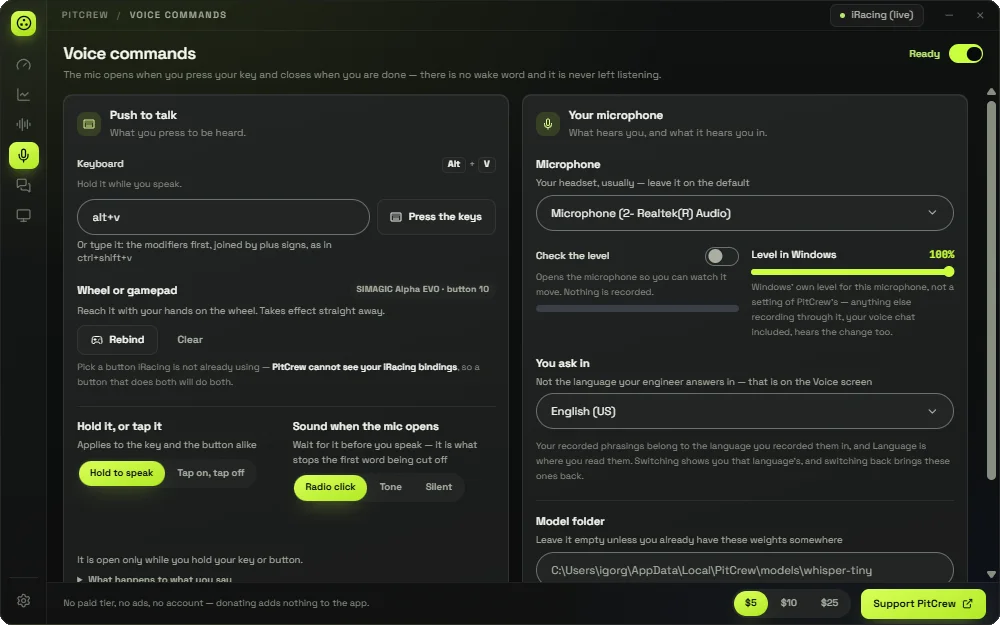
The mic opens when you press your key and closes when you are done. There is no wake word, and what you say is recognised on your PC.
Spoken calls also show as a banner over the sim, coloured by who said it. Pick a shape, set its size and opacity, and it fades five seconds after each call. Alt+H shows or hides it.
The rig serves the Companion and PIT pages to the PitCrew phone app or to any browser on your home network. Arrange the panels for the board, fuel, lap times, nearby cars and pit strategy. The app finds the rig over the network, or you scan the QR code on the desktop.